Thursday, 21 May 2015

Revised Prototypes (Second user-testing)

Home Screen (Alternatives)


Bedroom


Living Room


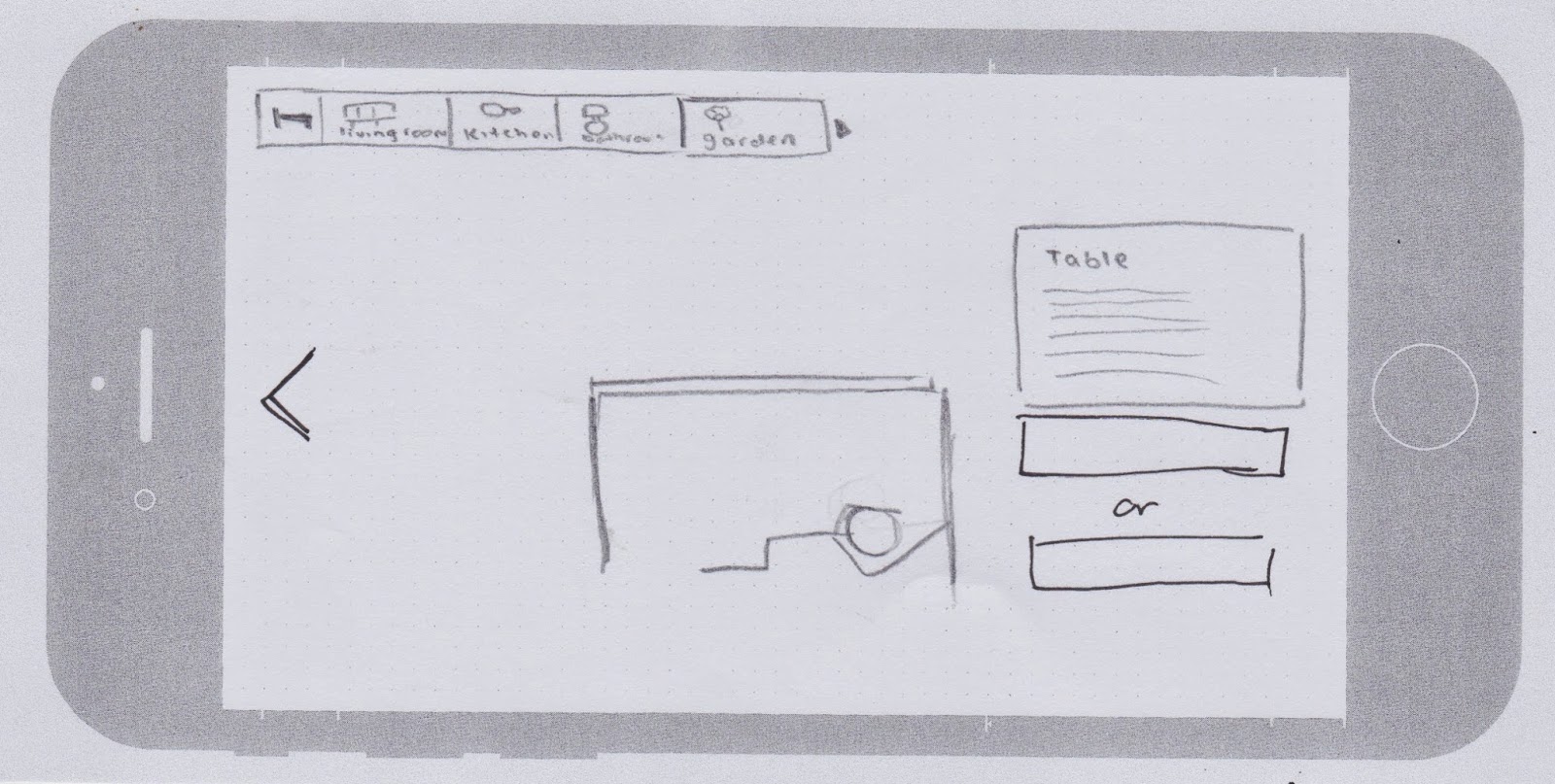
Garden (Outdoor)


Had some peers do a second user-test on our app. They quite like the idea of the house homepage as it is more cohesive with the other screens. Some problems that popped up was the uncertainty of what furnitures are clickable. Had a discussion that we may add some type of glow to the clickable furnitures and once they are completed, it will turn either red for hazards or green for safety. 

Also had a discussion about a "back" button that will allow the user to go back to the homepage. We were suggested that there should be an option to go back to the room you were previously in so they can try out the other furnitures in the room. From there, there could be another back button for the user to go back to the homepage to select another room if they wish. The slide button wasn't working out so we will be removing that as a whole. 

Other details that was suggested to us: we could show a mini version of the furnitures in each room on the homepage. Give a sense of what is in the room?


-Rebecca, David


Wednesday, 20 May 2015

Additional Research : Earthquake Safety

Looked more into earthquake safety tips. This images and video helped us get a clarification on what sort of approach we were aiming towards. Most likely a user experience and educational app. 


- David

Thursday, 14 May 2015

Revised Sitemap, Wireframe, Moscow & User testing


-Rebecca


User testing feedback:

-Think about the placement of the magnitude & tectonic plate slides. Or remove them completely as they don't really relate to the idea of safety and hazards. Having them at the start might confuse the user as they might think it's a slideshow rather than a game.

-Instead of the drop down menu, maybe try one where it slides out. 

-Selection of rooms? Instead of going straight to one room at the start, let the user select the room they want. 

-Make other furnitures clickable? 


Revised moscow.


-Rebecca, David


Tuesday, 12 May 2015

Revised Concept


Some initial concepts we had that lead into our revised idea. Our original idea and use of sensors was too complicated so we tried refining down to something more simple. (remembering usability and our target audience). We quite like the idea of incorporating both indoors and outdoors in our concept as it shows different scenarios where earthquakes can happen. 


After critique week and feedback from other peers, we found that our idea was still too broad. We decided to narrow it down even further and focus on one particular idea, while still considering the age group and usability. We reviewed our previous concepts and decided that we could try and incorporate different ideas from each one, but making sure our app is only doing one thing.
This prompted us to research some more information on earthquakes, and we found that many people already have a rough idea about earthquake and table safety but have no clue what to do when they are outside or in a room with no tables. We wanted to include our previous idea about earthquakes and outside safety with our initial idea of earthquakes when you're indoors. We felt that is would be important for kids to learn about different safety procedures and hazards (indoors and outdoors).


Some inspirations:

http://www.androidgame365.com/puzzle/9198-escape-action.html


How to Play:
- Tap, Tilt, Shake and Rotate you cell phone to solve the puzzles
- You can also pick up hidden items in the room and use them to find out a solution


-Rebecca

Sunday, 10 May 2015

Earthquake Outdoors


If you’re outdoors during an earthquake, move to a clear area away from trees, signs, buildings, electrical wires and poles. Move away from buildings, street- lights, and utility wires. Once in the open, stay there until the shaking stops.


If you’re driving , pull over to the side of the road
and stop. Avoid overpasses, power lines, and other hazards. Stay inside the vehicle until the shaking is over. Stop as quickly as safety permits and stay in the vehicle.

The greatest danger exists directly outside buildings, at exits, and alongside exterior walls. Many of the outdoor fatalities have occurred when people ran outside of buildings only to be killed by falling debris from collapsing walls. Ground movement during an earthquake is seldom the direct cause of death or in- jury. Most earthquake-related casualties result from collapsing walls, flying glass, and falling objects. 

Bridges can collapse, which crush you. If you are on a bridge, and it collapses, you will fall down to whatever is below it.

Ground movement during an earthquake is seldom the direct cause of death or injury. Most earthquake related casualties are from falling objects, flying glass, and collapsing buildings.


App finds

The research team at the Human Interface Technology Laboratory New Zealand (HIT Lab NZ) has been investigating software tools to create heritage interpretation mobile applications that can guide visitors by showing stories, pictures, and video clips based on the users’ location, and even presenting Augmented Reality visualization - 3D models appearing in the real world.


CityViewAR - See Christchurch as it was before the earthquake 


Goldfields Explorer - A virtual guide to the mining town and goldfield of Bendigo, Otago, New Zealand 


Interactive game. (Creating an experience for the user)


-Rebecca

Saturday, 9 May 2015

Interim Critique

We wanted to refine and finalise our sitemap for critique week and prototyping. We wanted to keep it simple for usability (remembering that our target audience are for young kids). We also got some feedback from our peers and tutors for further refinement. We decided to create various iterations to see which one is working better in terms of our earthquake safety idea. 
We also found that our ideas were too broad and was asked to focus on only one thing that our app is trying to teach/aid the user. After a few discussions we decided to focus on earthquake preparations.

1. Preparing a earthquake safety kit
2. Preparing for house hazards (preventions)
3. Preparing for an earthquake (drill)


-Rebecca, David


A motion detector is a device that detects moving objects, particularly people.
Could be used to detect the user while they have to perform the drill. The user will have to do "drop cover and hold" inside the outline. A sound will go off if you're doing it correctly. Interactive way to learn.


Another variation for the hazard idea. Instead of having a maze-like game we can just have certain furniture pop up and the user will have to either swipe left or right to make choices whether they are safe to hide in or not. 


Initial conveyor belt idea. However we decided that maybe we can put similar items together to trick the user? e.g. fresh fruits vs dried fruits. And we also took out the timer as it wasn't really relating to the whole preparation idea. Instead, there will be an immediate response to let the user know if they are correct/incorrect and why. 


-Rebecca


After critique week, we found that our ideas needed a lot more refining. We ran into a problem where our target audience (kids) will not be "packing a safety kit" or "preventing hazards". These actions are often performed by adults. There was a suggestion that maybe the kids may play this app to learn for future purposes or to inform their parents as kids often tend to tell their parents about things they have learnt or found interesting. Klaus also mention the games on our apps may work on a computer and we will need to find sensors to make our app more unique. This prompted us to do more research on sensors that could be utilised in our app. It was also suggested that we can try and base our ideas on more realistic situations that have happened. e.g. the big earthquake that occurred in Wellington a few years ago. Or maybe think about the earthquake house in Tepapa and how it helps inform kids about earthquakes?

-Rebecca